The best way to find new music on Bandcamp is through other fans. Open an album you love, click the people in its supported by section, and look through what else they bought. Follow the fans whose collections overlap with yours, and your Bandcamp feed fills up with their purchases. Tags, labels and Bandcamp Daily are useful second sources.
Bandcamp doesn't work like a streaming app. There's no "For You" page that learns your taste over a few weeks and keeps serving more of it. For some people that makes Bandcamp feel hard to explore. For diggers it's the whole appeal: what you find there comes from people, not from a model guessing what you'll skip.
This guide covers the methods experienced Bandcamp diggers actually use, starting with the one that finds the best records.
Why Bandcamp discovery is different
On a streaming service, a play costs nothing, so recommendations are built on listening behavior: what you didn't skip, what people like you didn't skip. On Bandcamp, the strongest public signal is a purchase. Every album page shows the fans who bought it, and every fan who leaves their collection public shows you everything else they paid for.
That's a different kind of data. Someone who spent money on a limited cassette from a tiny label in Lisbon made a deliberate choice. If you own that cassette too, the rest of their collection is worth a look. Nobody needs to model your taste for that to work. You just need to find the right people.
1. Start from a record you'd defend
Your starting album matters more than anything else. If you start from a huge release with thousands of buyers, the people in its supporter list will be all over the place. Start from something narrower: a record you love that most of your friends haven't heard, on a small label, in a scene you care about.
Good seeds tend to be:
- Releases with a few dozen to a few hundred supporters, not thousands
- Records from small or self-run labels
- Albums you'd play for someone to explain what you're into
2. Work the "supported by" list
Scroll down on any album page and you'll find a row of small avatars under supported by. Each one is a fan who bought the release. Some also leave a note or name their favorite track, which is often more useful than any review.
Click an avatar and you land on that fan's collection page. Here's what to look at:
- Overlap. When you're logged in, Bandcamp shows how many items you have in common with that fan. More shared records is a good sign.
- Collection size. 20 shared records means a lot more from someone who owns 150 records than from someone who owns 4,000.
- Recent purchases. A collection sorted by newest tells you what this person is into right now.
- Their wishlist. Many fans keep wishlists public. That's a preview of what they're about to buy.
Open the albums you don't know, listen to a minute of each, and wishlist anything that grabs you. Then go back to the original album and try the next avatar.
3. Follow fans, then read your feed
When you find a fan whose collection looks like yours, follow them. Bandcamp's feed shows activity from the artists and fans you follow, so their new purchases start showing up there on their own.
This is the part most people skip, and it's the part that compounds. Ten well-chosen fans turn your feed into a steady stream of records that real people with your taste just paid for. A hundred random follows turn it into noise. Be picky.
4. Follow labels, not just artists
Artists release a record every year or two. A good label might release something every few weeks, and someone there is filtering hundreds of demos to choose it. When you notice the same label behind three or four records you love, follow it and go through its back catalog.
Many labels also offer a Bandcamp subscription. You pay once a year and get everything they release, and you keep the music even if you cancel.
5. Use tags with intent
Tags are how artists describe their own music. Browsing a single broad tag like "electronic" is overwhelming, but tags get useful when you narrow them down:
- Spell tags the way Bandcamp does. "drum & bass" works where "dnb" may not.
- Combine a genre with a place, a mood or a format: dub techno plus a city, ambient plus cassette.
- Sort by new arrivals to see releases before they get written about.
Tags tell you what an artist calls their music. Fan collections tell you who actually bought it. Use tags to find a few starting points, then switch to the supporter lists.
6. Read Bandcamp Daily
Bandcamp Daily is Bandcamp's own editorial site, with album reviews, scene guides and monthly genre roundups written by people who know those scenes. It's the best way to find out why a record matters, not just that it exists. Treat each article as a list of new seed records for step 1.
Where the manual method breaks down
The supporter-list method finds great music. It's also slow. A modest release can have 300 supporters, and each of them might own hundreds or thousands of records. Clicking through them one by one means:
- Checking each fan's overlap with you by hand
- Doing the math in your head to tell a real match from a huge collection
- Forgetting which fans you already checked on which album
- Missing the person who shows up on four of your favorite records, because you only looked at one
That last point matters most. The fan who bought four of the records you love is almost certainly worth following. The fan who bought one of them, plus 3,000 others, probably isn't. You can't see that pattern from one album page.
A faster way to find your taste twins
TasteTwins is a free Chrome extension that does the supporter-list work for you. It doesn't recommend music, and there's no algorithm deciding what you'll like. It counts how many records you share with the real people who bought the albums you love, and ranks them.
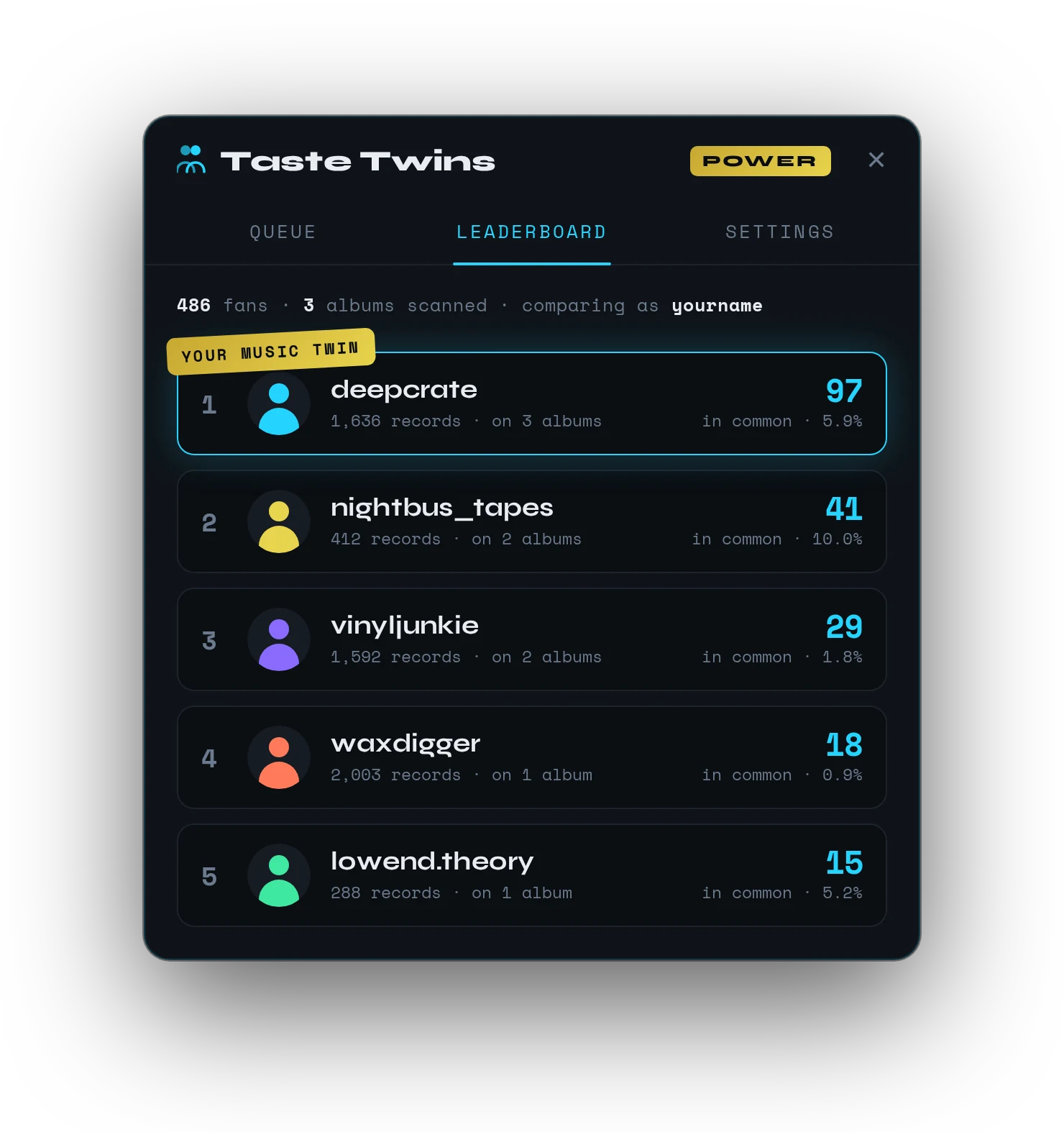
Open any album, click the TasteTwins button, and it scans the album's supporters in the background while you keep browsing. Queue a few of your seed records and fans who appear across several of them build up higher scores. Every fan shows both the number of shared records and the overlap %, so a collector with 4,000 records doesn't drown out the person whose 200-record collection looks just like yours.
From there it's the same old-school digging as before. Click into your top matches, look at what they own that you don't, and follow the ones who feel right. The difference is that you start from the best people instead of a random avatar.
FAQ
Does Bandcamp have an algorithm?
Not in the streaming sense. There's no personal "For You" feed that learns from your listening. Discover sorts releases by things like genre, newness and recent sales, and album pages show other releases that fans also bought. Most discovery on Bandcamp comes from people: fans, labels and editors.
Can I see what other people bought on Bandcamp?
Yes, if their collection is public. Click any avatar in an album's "supported by" section to open that fan's collection, and often their wishlist too. Some fans keep their collections private, and those don't show up.
How do I see my feed on Bandcamp?
Log in and open your feed from your account menu. It shows new releases and purchases from the artists, labels and fans you follow. It's only as good as the people you follow, so choose them carefully.
Is TasteTwins free?
Yes. TasteTwins has a free plan with no credit card required to install. A paid Power plan adds an unlimited album queue and bigger scans for heavy diggers.